A music practice tracker that shows where to pick up
Play a song or video in Practice mode and the log fills in as you practise. Start with the overall picture of when and how long you practised. Then open one song to see the speeds and passages you worked on, and pick up where you left off. No separate timer or journal entry is needed.
First, the overall picture: Practice Stairway
The Practice Stairway shows your practice time by date. Switch between days, weeks and months; select a bar to open a recap of what you played then. Daily goals and streaks can remind you to return.
The interactive Practice Stairway from the landing page. Select a bar to open an example recap. Its numbers are fixed demo data, not your practice record.
Then, one song: speeds and Spots
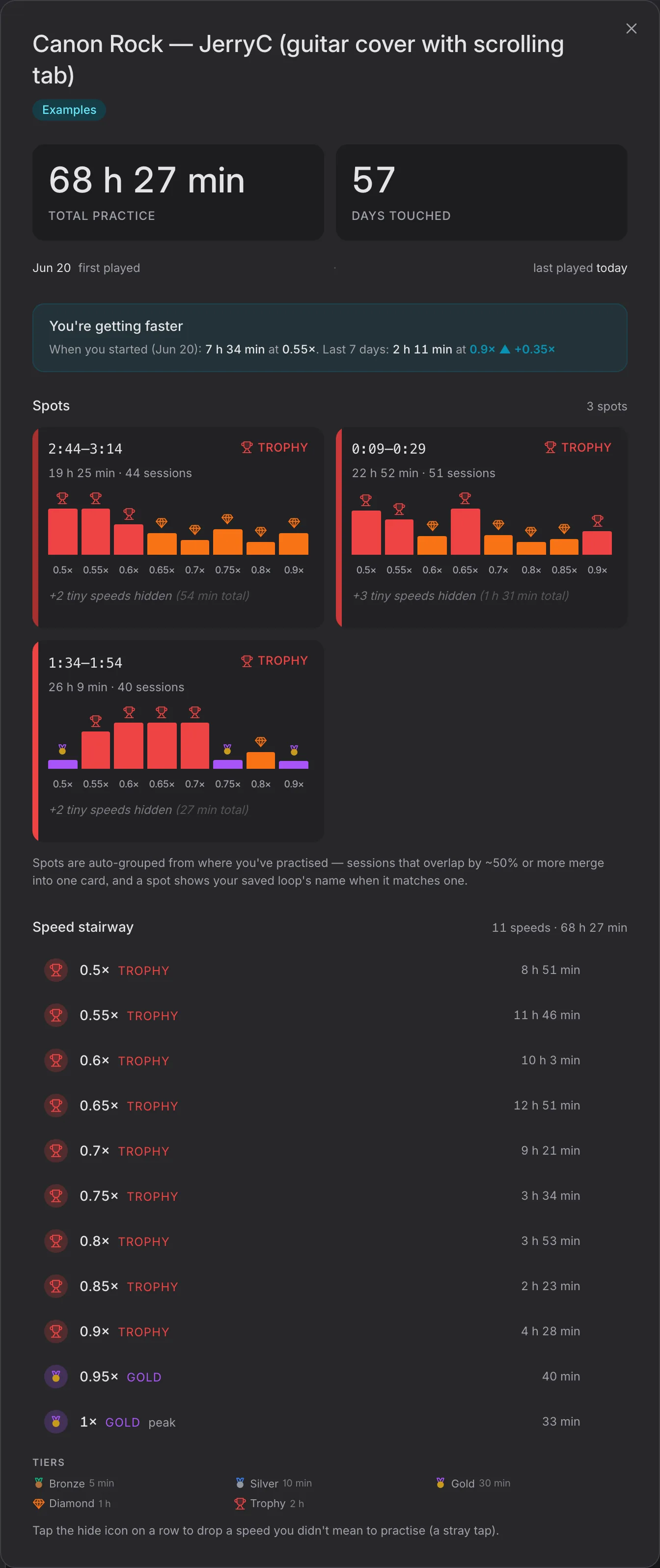
A song's Stats show its total practice time and the number of days you worked on it. The clock runs during playback; pauses do not count. Change the speed or loop boundaries and the next stretch is recorded with those settings, so time at 0.70× is not mixed with time at 1×. You can loop and slow down a passage as usual.
The Speed Stairway separates time spent at each playback speed. Spots group the ranges you worked on, helping you find a difficult passage again. If you named and saved a loop, you can reopen it from the song's saved loops.
View full Example Stats ↓Collapse Example Stats ↑
Screenshot of the product's built-in Example Stats. Its numbers and relative dates are fixed demo data, not your practice record.
For example, if you spent Monday on a chorus at 0.65× and Thursday at 0.80×, the record shows where the time went. It does not prove the chorus was played correctly or that the higher speed is now comfortable.
Use it for the next session
Open the song's Stats and find the speed or Spot you want to revisit.
Return to that passage or open its saved loop. The current range and speed are remembered for that song in this browser, even if you did not give the range a name.
Practise again, then compare the new time with the earlier record. If the passage is still rough, stay at the slower speed; the chart is evidence of practice, not a target to chase.
Free record, optional account
Practice tracking, the overall and per-song charts, recaps and saved loops are free without an account. A guest's record lives in this browser; clearing its data can remove it. A free account lets your practice history follow you to another device. Pro adds two deeper cross-song speed views, but is not required to keep or read the ordinary practice log.
FAQ
Do I need to start a timer?
No. The app records playing time in Practice mode; paused time is left out.
Is the record in the example my own?
No. It is an illustrative song with example history. Your own record begins when you practise a song you have added.
Can I continue on another device?
Yes, with a free account. Without one, your practice history stays in the browser where you made it.
Pick one short passage, practise it today, then look at its Stats before your next session.